One flat price per setting
However many children or staff you have, you pay one simple price — never per child. The whole app, no setup costs, no surprise upsells.
Spend less time on admin and more time with the children. The diary, the records, the parents and the paperwork — kept organised, private and Ofsted-ready.
One flat priceBuilt for the EYFSMade with real settings
14-day free trial · no per-child fees · cancel anytime
Not a US product with the spelling changed — built here, priced fairly, and shaped by the people who use it every day.
However many children or staff you have, you pay one simple price — never per child. The whole app, no setup costs, no surprise upsells.
Designed around the EYFS, Ofsted ratios and UK GDPR from the start. Your data is held to UK standards — not bolted on after the fact.
Shaped alongside real childminders and nurseries, and improved from their day-to-day. We don't sell ads or track your visitors — the records belong to you.
Childcare management software that gives you one home for the diary, the records, the parents and the paperwork — designed to make admin disappear into the background so you can focus on the children.
Quick entries for feeds, naps, nappies, mood and activities — tag observations to EYFS areas as you go.
Allergies, medical notes, emergency contacts and photos in one place. Archive children when they leave — never lose the record.
Polish a note scribbled between rooms into an EYFS write-up, or have the progress check at age two drafted from a child's own observations and milestones. It works only from what you recorded — it won't invent a skill nobody saw — and children's and staff names are stripped before anything is sent.
Each family gets a private window to their child's day — no app to install, no password to manage.
Send a contract by link, parents sign in the browser, audit trail kept on file. No printing, no chasing.
Set a schedule once. Monthly invoices generate on their own, a tidy PDF every time, and you see who's paid.
Track development across the seven areas, and export a learning journal as a PDF whenever you need it.
Chat one-to-one with each family inside the app — every conversation in one tidy thread, no extra app to download.
Risk assessments, fire drills, policies, accident and medical records — with review reminders so nothing lapses.
Pick yours — the highlights tailor to match.
Feeds, naps, nappies and mood in a tap — built for logging while you're holding a baby.
A private window to each child's day, plus a one-to-one thread — no app for families to install.
Send contracts to e-sign and let recurring invoices generate themselves — you just see who's paid.
Log expenses against your invoice income — the use-of-home and wear-and-tear allowances are worked out for you, ready for your tax return. No more spreadsheet.
All the core features, plus much more. Nurseries get the whole platform — diary, observations, registers, invoices, medication and safeguarding — with these extras built for your setting.
Organise children into Babies, Toddlers and Pre-school — each with its own register and staff.
Green when a room's covered, amber at the limit, red when it's short — worked out as staff and children change.
Build each person's shifts in a tap, assign them to rooms, drop in cover — the week fills itself in.
One tablet, the whole team. Staff tap their name and enter a PIN, so every entry is filed under who actually wrote it — and the tablet locks itself when idle.
Food stock with low-stock alerts, allergen-aware menus and the EHO hygiene records inspectors expect.
Tidy a rough note into an EYFS write-up, or draft the progress check at age two from a child's own observations — only ever from what you recorded, with names stripped before it's sent.
Capture eligibility codes, set your LA rate, and auto-deduct funded hours on invoices.
A read-only dashboard spans every site, and each setting gets its own secure sign-up link.
A staff room in the app: handover notes, who's covering, @mentions that show when a colleague is on leave. Open channels, no private messages, nothing on WhatsApp.
We read the children in each room and the staff on shift, and work out your EYFS ratios live — green when you're covered, amber at the limit, red when a room needs cover.
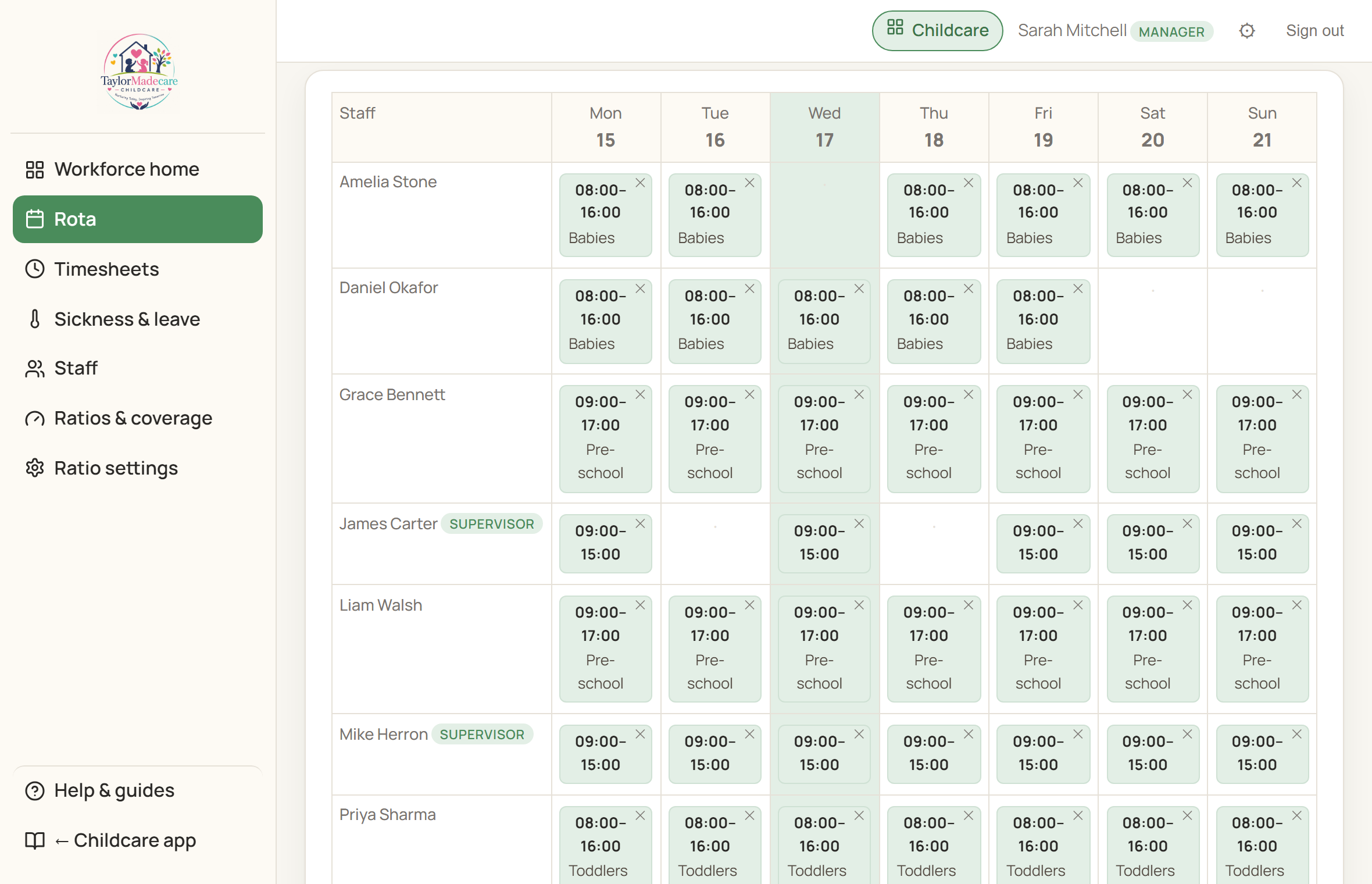
Set each person's regular shifts once and the rota builds itself across the week — assign them to a room, drop in one-off cover, and see the whole team at a glance. Works just as well on a tablet at the setting as on a laptop.
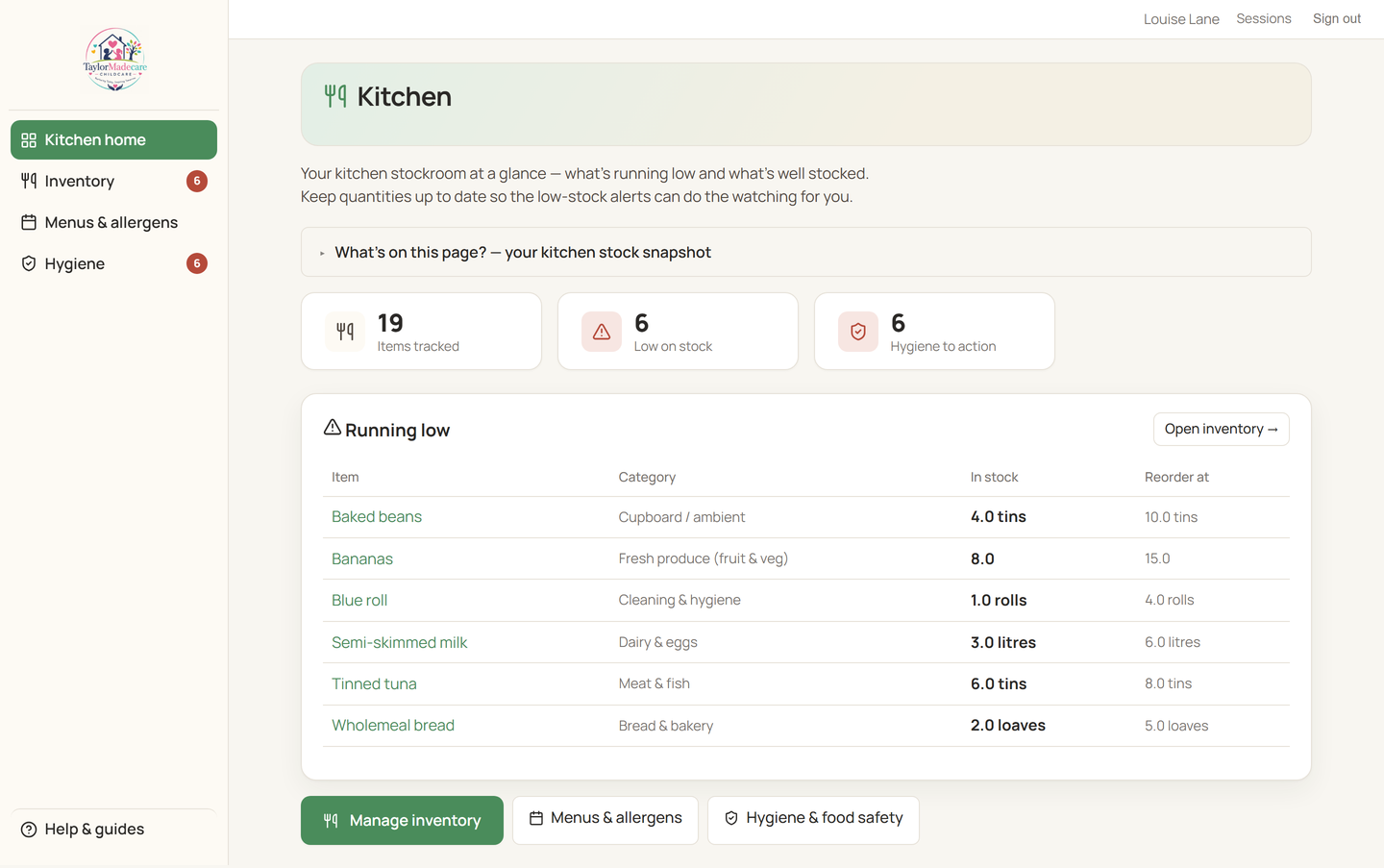
Give your cook their own login: track food stock with low-stock alerts, plan allergen-aware menus that flag affected children, and keep the fridge-temperature, cleaning and EHO records inspectors expect — all in one place.
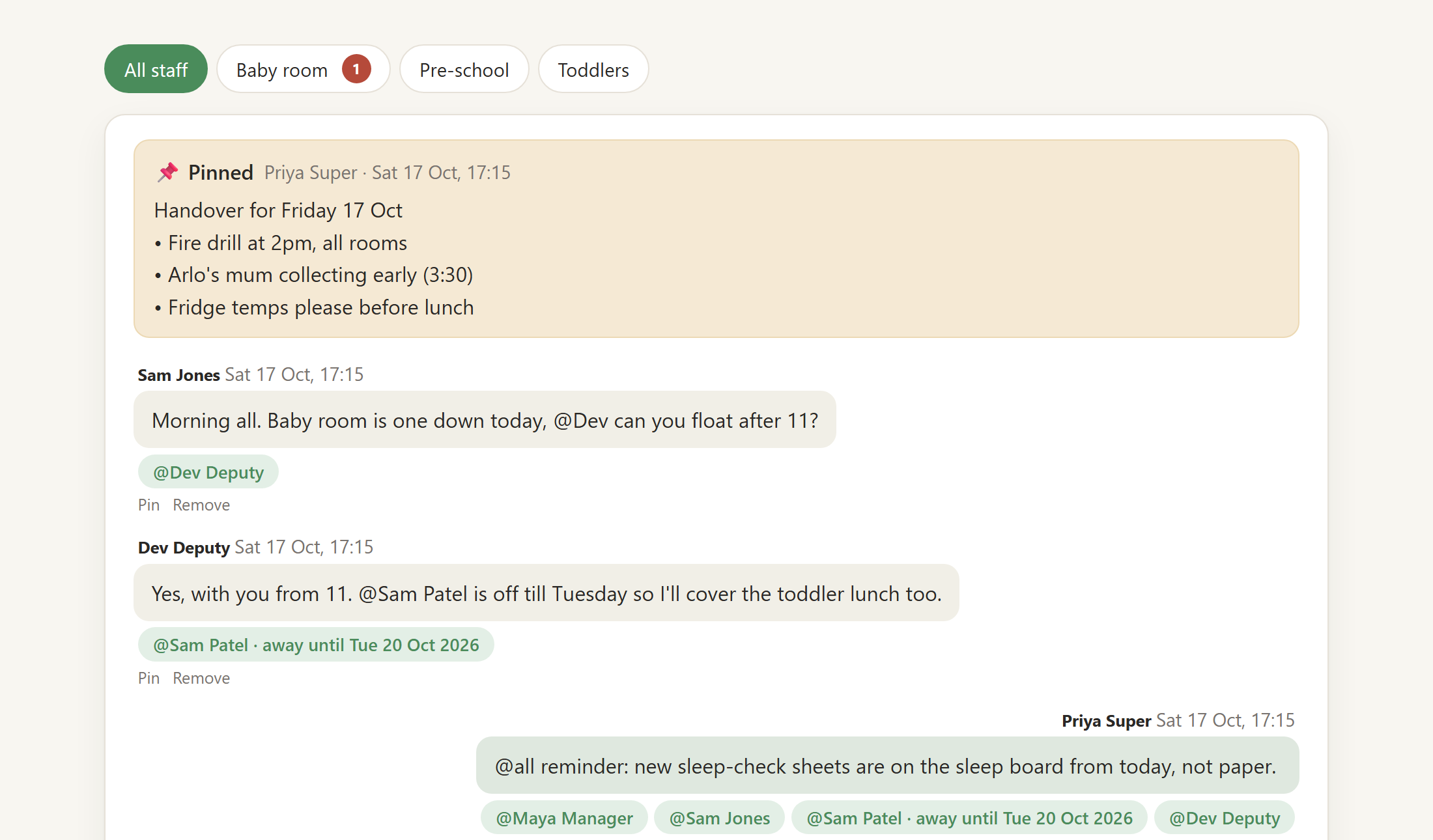
Team chat gives your staff one place for the day's running: handover notes, who's covering the baby room after lunch, a heads-up before the fire drill. One channel for everyone and one per room, all in the open, so a conversation about a child is never somewhere a manager can't see it.
Tag a colleague and it lands in their count. If they're on leave or off sick today, the rota already knows, and the message says so: away until Tuesday. Pin the handover so it sits at the top of the room all day.
No private messages by design, and it doesn't appear on shared room tablets. Messages are kept for two years by default, then removed; you choose 12 months or keep everything.
The "Today" view brings together who's signed in, what's on the menu and every diary entry — plus the local weather and the week ahead. One screen, so you pick up where you left off without hunting for anything.
Pencil in outings, visits and activities days ahead. Each day carries its own Met Office forecast, so a rainy Wednesday becomes messy-play indoors and a sunny Friday becomes the park. Anything you mark as shared appears on parents' private links.
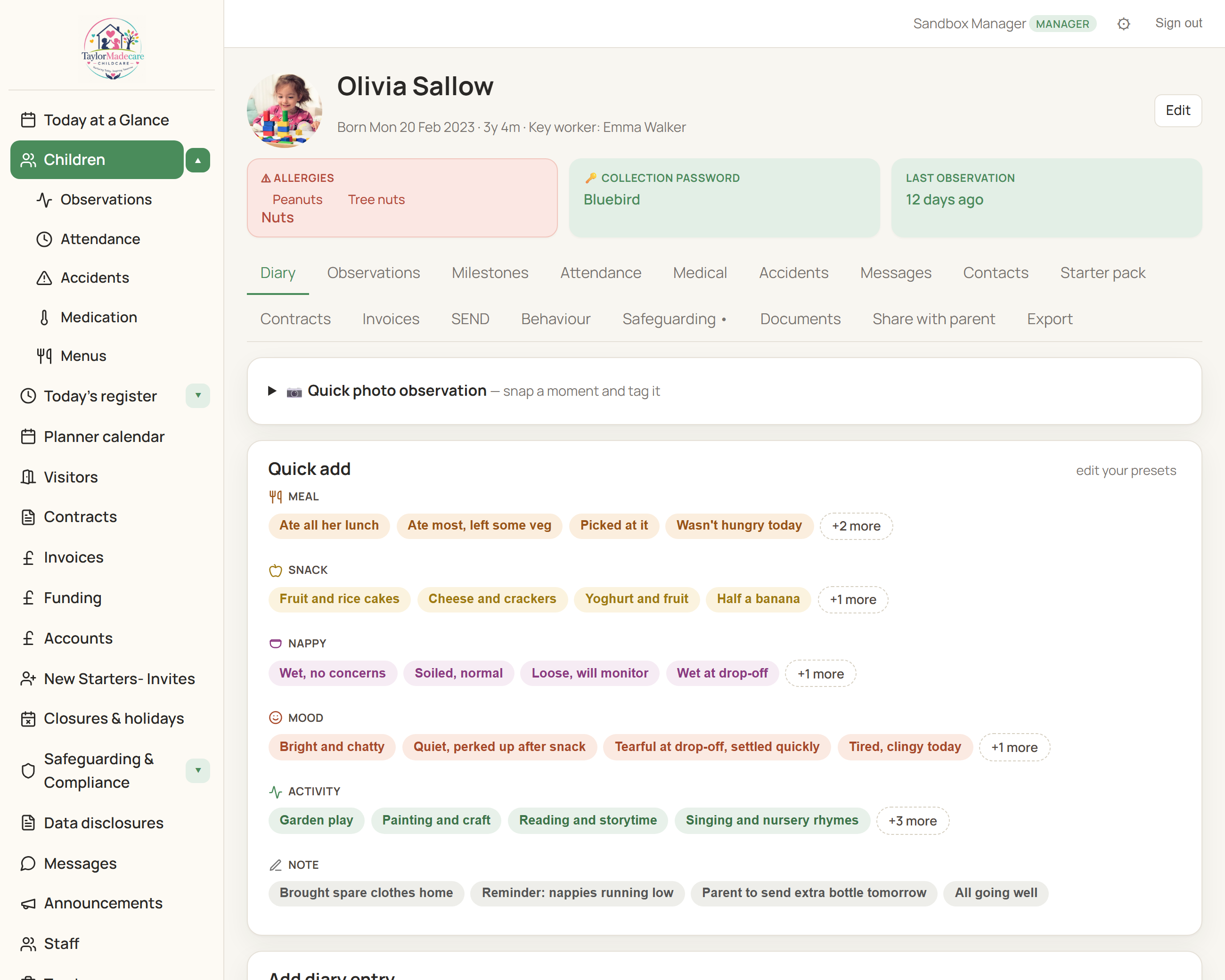
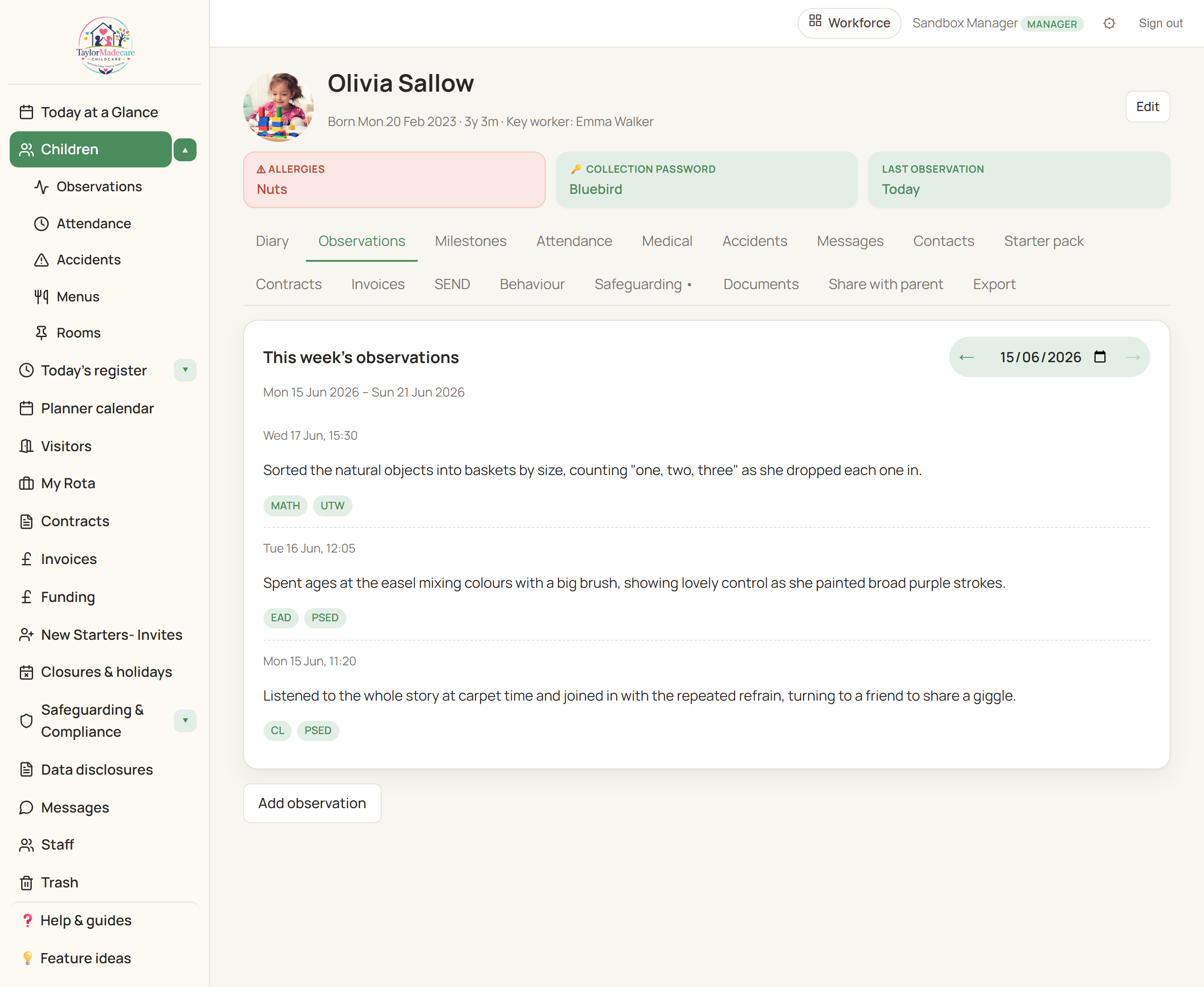
Each child has a single profile pulling together diary, observations, attendance, medical and accident records, contracts, invoices and EYFS milestones. Allergies sit at the top as a clear warning; the collection password is right there on the same screen — no hunting through folders when somebody's at the door.
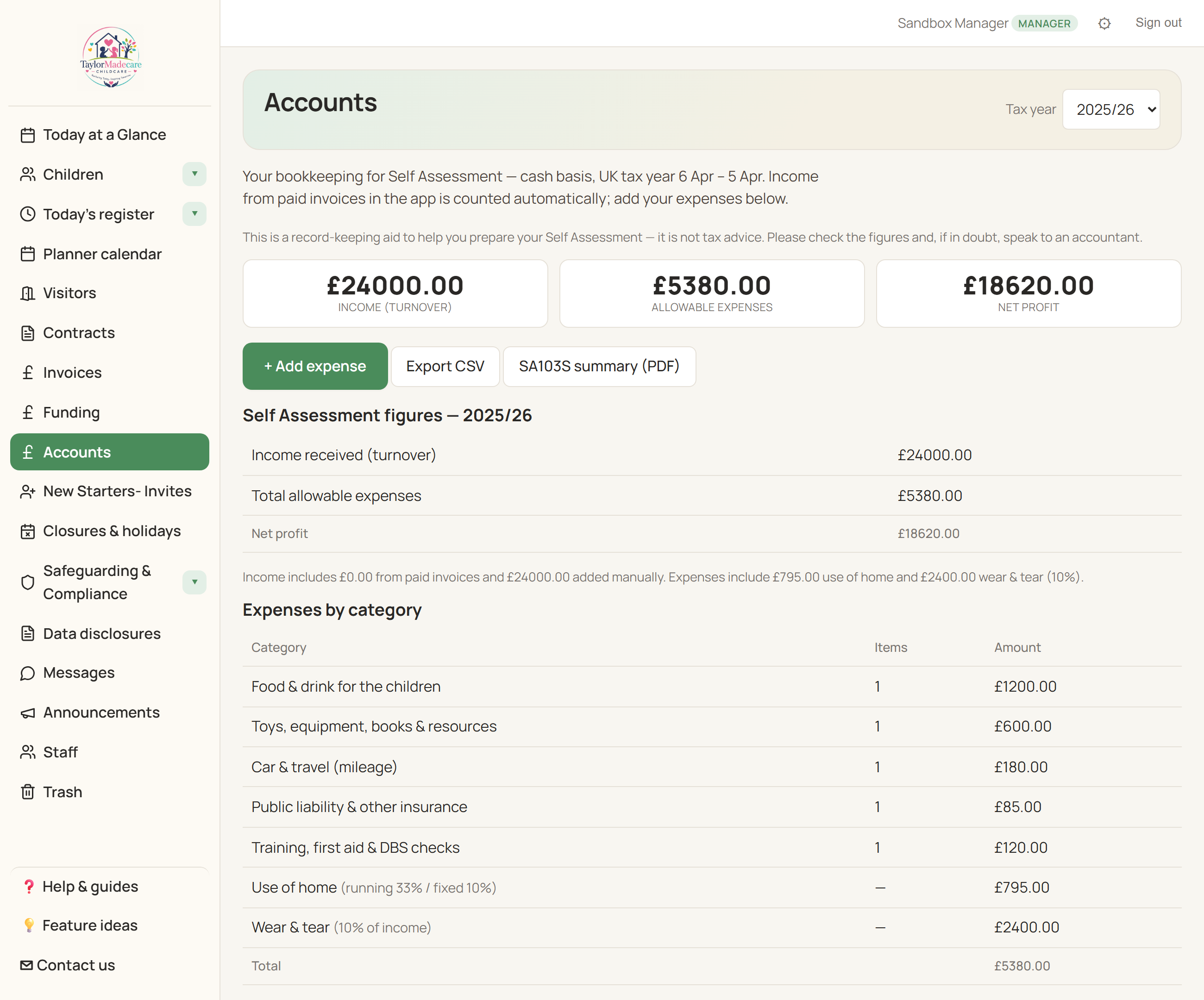
Log your expenses and the income from your invoices, and the Accounts page works out the childminder use-of-home and 10% wear-and-tear allowances for you — leaving you Self Assessment-ready figures and a PDF to hand your accountant. It even switches the wear-and-tear allowance off automatically if you cross the Making Tax Digital threshold. No more tax spreadsheet.
Quick-add is built for one-handed use while you're holding a baby. Tap the chip, pick a child, done — no menus, no forms. Because the fastest way to log the day is the one that doesn't pull you away from it.
Done. Back to playing.
Jot down what you noticed, tag the moment against the seven areas of learning, and build a record that grows with the child — then export the whole learning journal as a PDF whenever you need to share it with parents or Ofsted.
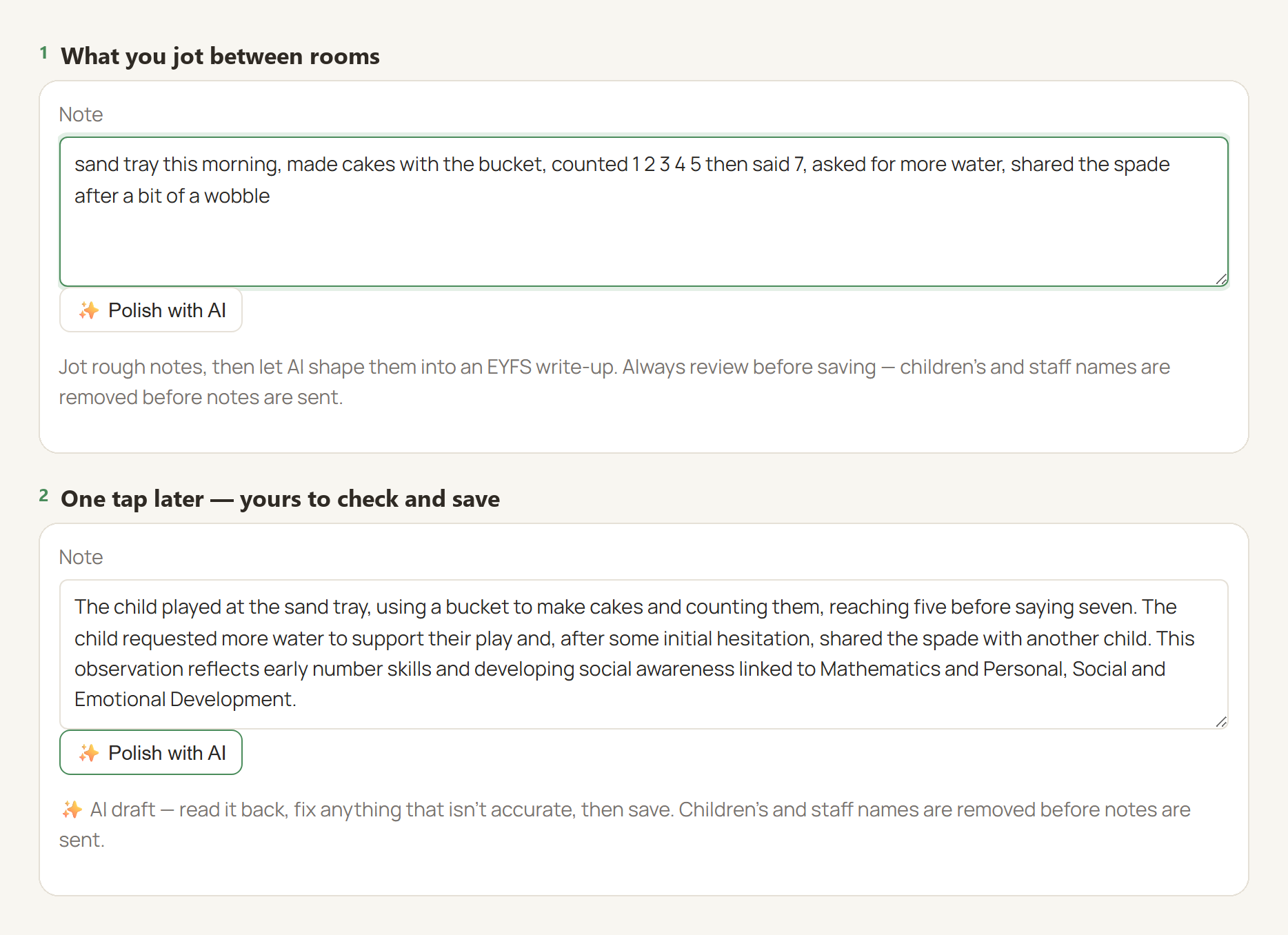
Jot the note in a hurry and let Polish with AI turn it into something a parent would be glad to read. It works only from what you actually wrote — it won't invent a skill you didn't see, and if the note is too thin to write up honestly it says so rather than filling the gap.
Children's and staff names are removed before anything is sent, nothing you write is used to train a model, and no draft ever saves itself: you read it back, change what you like, and decide. The same rules cover the progress check at age two, drafted from the child's own record.
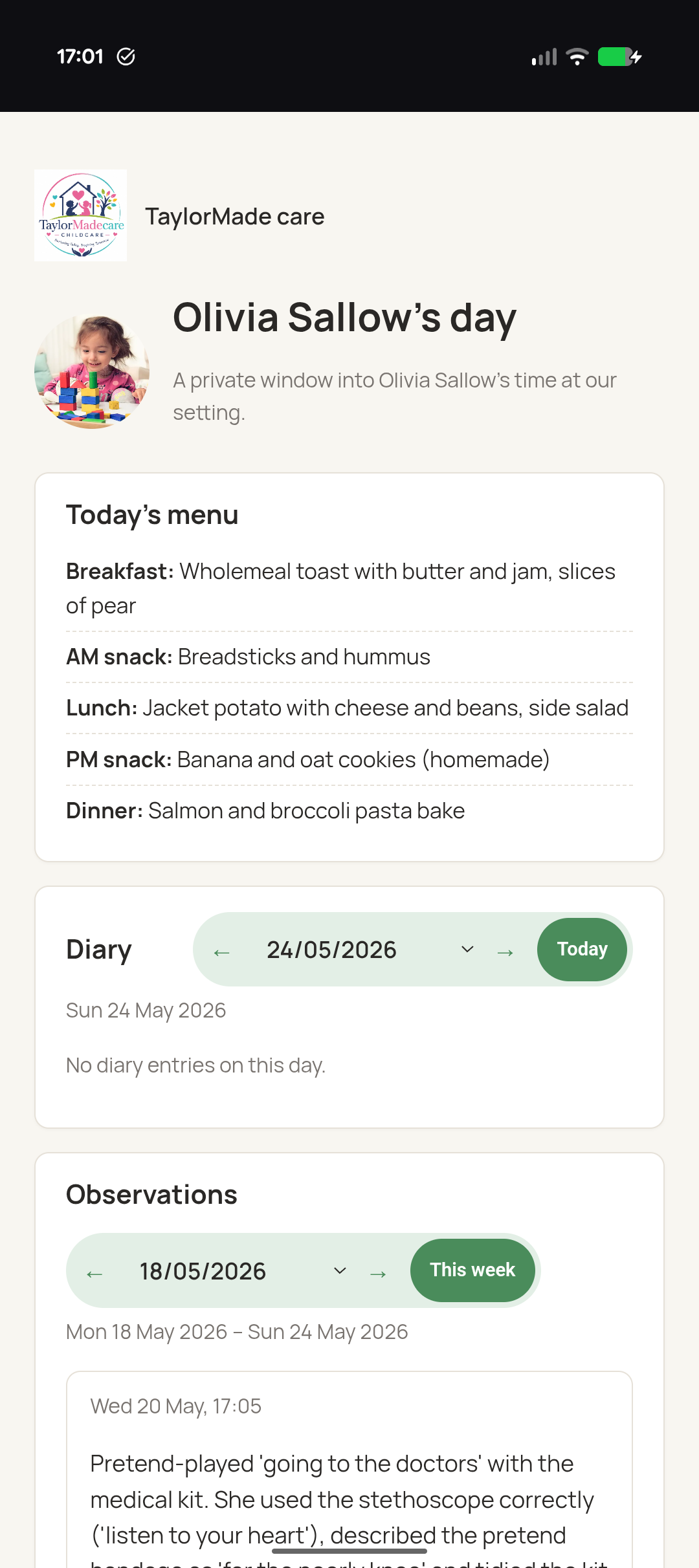
Every parent gets a unique link to just their child's day — your branding at the top, today's menu, the diary as it builds. Accident records and medical notes are emailed and signed online with one tap, each acknowledgement timestamped. No app to install, no password to manage.
From the same private link, parents see their child's booked sessions for the next four weeks and can ask for an extra session, cancel one, or change their regular days. Nothing changes until you say yes. No app to install and no password, just the link they already have.
New families can pick the days they'd like on their starter pack too, ready for you to confirm.
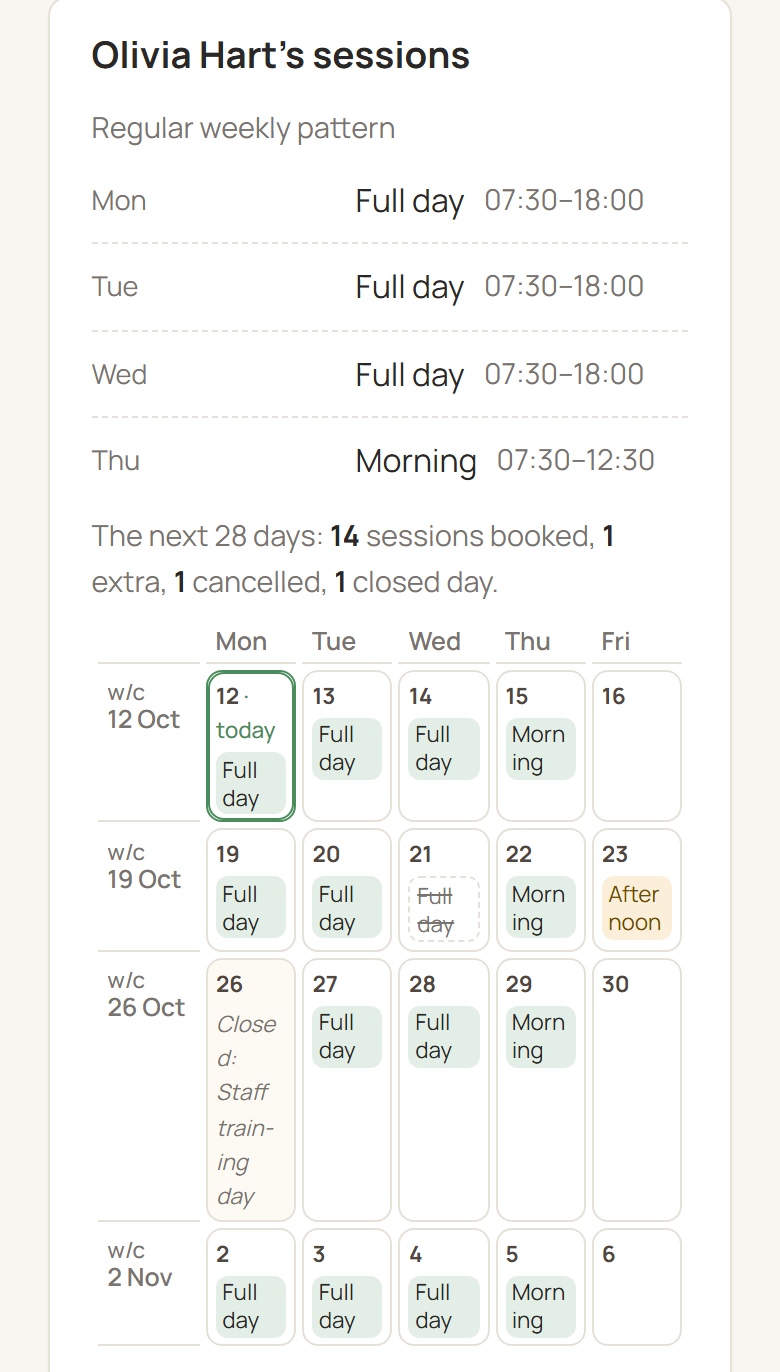
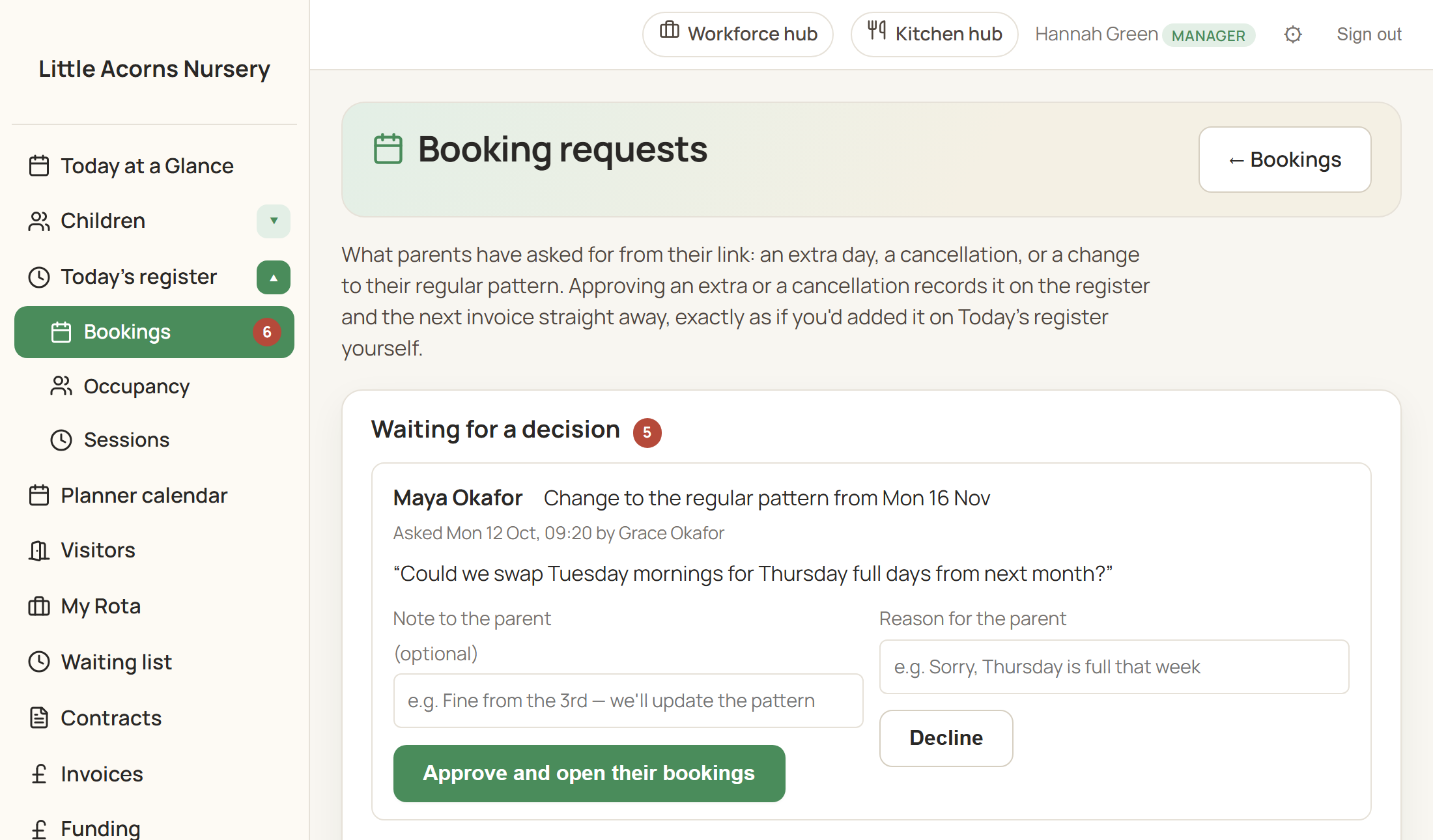
Each request lands in your bookings inbox with the spaces left that day beside it. Approve or decline, and the parent is emailed your answer. An approved session goes straight onto the register and is charged at your usual session rate.
If a session is full, the family joins a waiting list and is offered the place when one comes up. Would you rather not approve each one? Let extra sessions confirm on their own while there's space. Running a club? Release just the days you're open for booking.
Parents ask for sessions here; they don't pay at the point of booking. Sessions go on your normal invoice. It's off until you switch it on under Sessions.
The headlines above are just the start. The rest covers compliance, business admin and the day-to-day in equal measure.
Looking after children's information is a serious responsibility. Here's how we keep yours protected — and every feature lands first in a sandbox, so by the time it reaches you it's been used in anger.
Sign up, confirm your email, add your details and your first child — most settings are running in under half an hour. Nothing to install; you log in through your browser.
No. It's one flat price for your whole setting, however many children or staff you have. Competitors often charge per child per month — we don't.
Yes. Add staff from the Staff page with their own login. Managers see everything; staff see the day-to-day records but not contracts, invoices or sensitive areas like SEND.
Yes. Connect your Gmail or Outlook in Settings and parent emails go from your real inbox — no clunky "no-reply" address. Any SMTP provider works too.
You do. Each business's data is isolated from every other; we don't access it for any purpose other than supporting you when you ask.
Archive them with one click — the full record stays on file and can be restored later. Permanent deletion is manager-only and asks you to type the child's name to confirm.
Yes. Every UK provider handling parents' and children's records needs to register with the ICO as a data controller. We handle your data securely on your behalf, but the registration is yours.
Records cover EYFS observations, attendance, medical notes, accidents, contracts, policies and risk assessments. The PDF exports — including the learning journal — are designed to be evidence-ready.
Yes, any time. Learning journals, contracts and invoices all export to PDF, and we'll provide a full export of your records before closing your account so nothing is lost.
Set up your whole setting in an afternoon, with personal UK support if you get stuck — and nothing to pay until you're sure.
Start your free trial Talk to us first
